How to Get Your CAS Statement
A Consolidated Account Statement (CAS) is the official record of all your mutual fund holdings. It's free, takes 2 minutes to request, and arrives in your email.
Step 1 — Go to CAMS Online
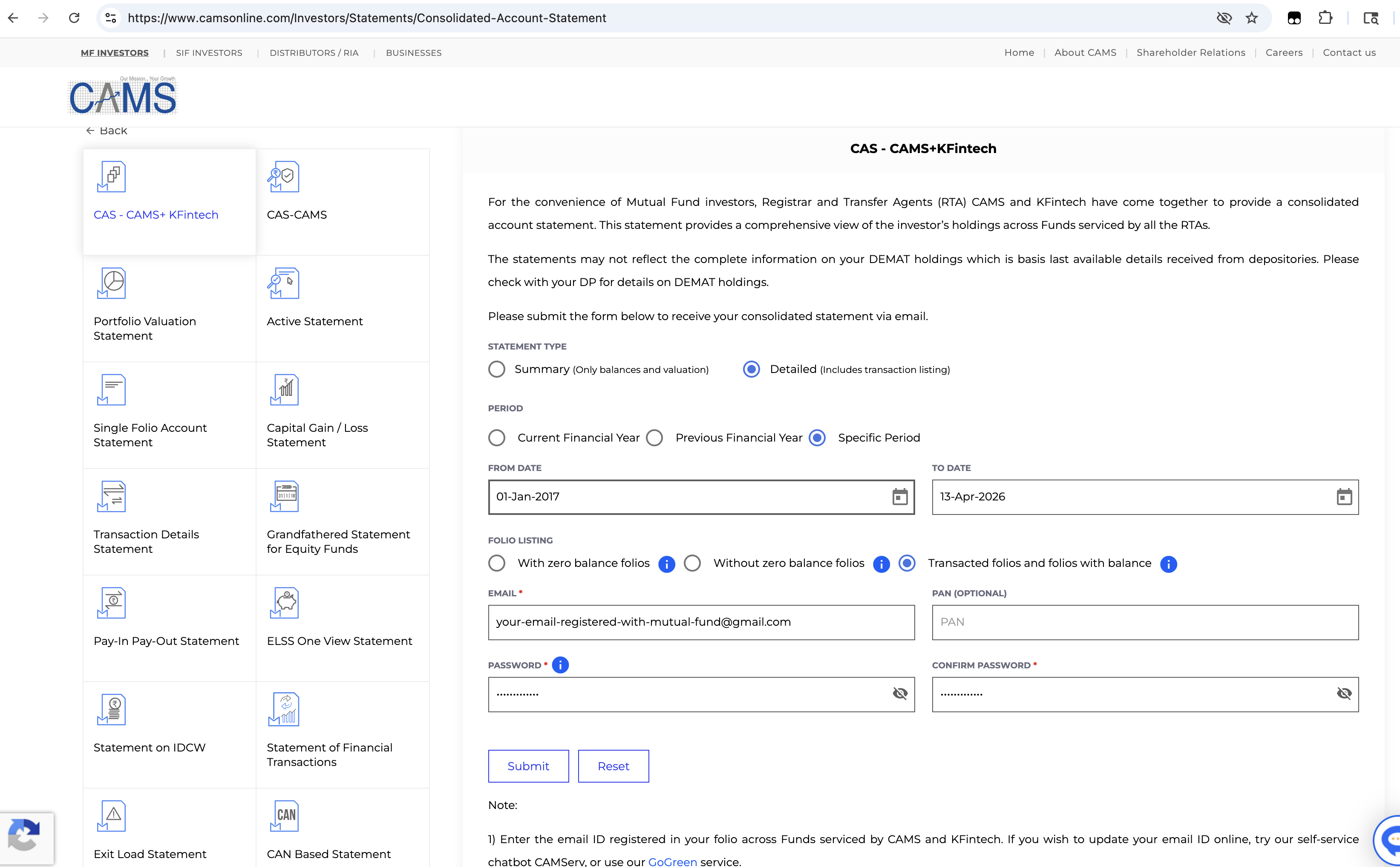
Visit camsonline.com → Consolidated Account Statement. Select CAS - CAMS+KFintech from the left panel (this covers all mutual fund houses).
Step 2 — Fill in the form
Use these exact settings:
Step 3 — Check your email
Within 10 minutes, you'll receive an email from CAMS with a PDF attachment. Download it and come back to FinBestie to upload.
Step 4 — Upload to FinBestie
Click Upload your CAS on the home page, select the PDF, enter the password you set in Step 2, and hit Upload. Your portfolio will be ready in seconds.
Common Questions
I have an NSDL or CDSL statement. Will that work?
Not yet — we currently support CAMS and KFintech CAS only. These cover all mutual fund houses. NSDL/CDSL support is on our roadmap.
Which email should I use?
The email registered with your mutual fund AMC. If you invested via Groww, Coin, or Kuvera, it's usually the email you signed up with on that platform.
Why "Detailed" and not "Summary"?
The Detailed statement includes your full transaction history (every SIP, redemption, dividend). This lets us calculate your true XIRR returns and show the invested vs current value chart.
Can I also use KFintech instead of CAMS?
Yes! Visit KFintech CAS page and follow the same steps. Both work identically.
Is my data safe?
Your PDF is parsed on the server and the data is stored locally. We don't share it with anyone. You can delete your account and all data at any time.